

At first glance, Bluehost appears very affordable. The promotional prices look attractive, especially for beginners launching their first website.
But hosting pricing is rarely as simple as the headline number on a landing page.
Once I started digging into the details – renewal pricing, optional add-ons, and long-term billing – it became clear that the real cost of hosting is more complicated than the initial offer suggests.
In this investigation, I break down Bluehost pricing in 2026 based on actual billing structure and common user experiences. The goal is to understand how the pricing really works over time.
By the end of this analysis, you’ll understand:
-
the real structure behind Bluehost hosting plans
-
why renewal costs are significantly higher than introductory prices
-
what hidden or optional fees may appear during checkout
-
whether Bluehost pricing actually delivers long-term value
How Bluehost Pricing Works in 2026
When I first reviewed Bluehost pricing, the introductory offers looked extremely competitive. Promotional pricing is common in the hosting industry, and Bluehost follows the same model used by many large providers.
The key idea behind this model is discounted first-term pricing.
Most Bluehost plans advertise a low monthly rate, but that price usually applies only when purchasing a longer upfront billing period, such as 12, 24, or 36 months.
In practice, this means the “monthly price” displayed on the website is often a calculated average, not a true month-to-month billing rate.
For example, a plan advertised at a few dollars per month may actually require paying several years of hosting upfront in a single payment.
From a user perspective, this approach can feel confusing if the pricing structure isn’t fully understood before checkout.
Bluehost Pricing Plans Explained

When I first started reviewing Bluehost pricing, one thing became clear quickly: the plans look simple on the surface, but each tier introduces differences in website limits, storage flexibility, and additional tools.
Most beginners start with WordPress hosting plans, which are designed for small to medium websites. During my review, I noticed that Bluehost structures its WordPress and shared hosting tiers to gradually add more flexibility as websites grow.
Instead of simply offering “more storage,” the higher plans typically include additional websites, enhanced security features, and more automated tools.
Here’s a clearer breakdown of how the plans typically differ.
| Plan | Best For | Websites Allowed | Storage | Included Features | Key Limitations |
|---|---|---|---|---|---|
| Basic | Single blog or starter website | 1 website | Limited SSD storage | Free domain (first year), free SSL, basic performance features | Only one website, fewer backup and security features |
| Plus | Multiple small websites | Unlimited websites | Higher SSD storage allocation | Free domain, free SSL, email hosting, website management tools | Backup tools and security add-ons may still be optional |
| Choice Plus | Growing websites needing protection | Unlimited websites | Similar storage to Plus | Domain privacy included, automated backups, improved security tools | Higher price compared to entry-level plan |
| Pro | Websites expecting heavier traffic | Unlimited websites | Larger storage allocation | Higher resource allocation, enhanced performance environment | Costs significantly more than entry plans |
From a practical standpoint, most new website owners don’t necessarily need the higher-tier plans immediately.
During my review process, I found that many small websites run comfortably on the Basic or Plus plan, particularly if traffic remains moderate.
However, websites managing multiple projects or expecting traffic growth may prefer the additional flexibility offered by Choice Plus or Pro.
The key takeaway is that Bluehost pricing tiers are primarily structured around website capacity and management tools, rather than dramatically different server technology. For a deeper look at how these plans perform under real-world conditions, check out our Bluehost speed test and performance review.
Bluehost Renewal Pricing: What Happens After the First Term?
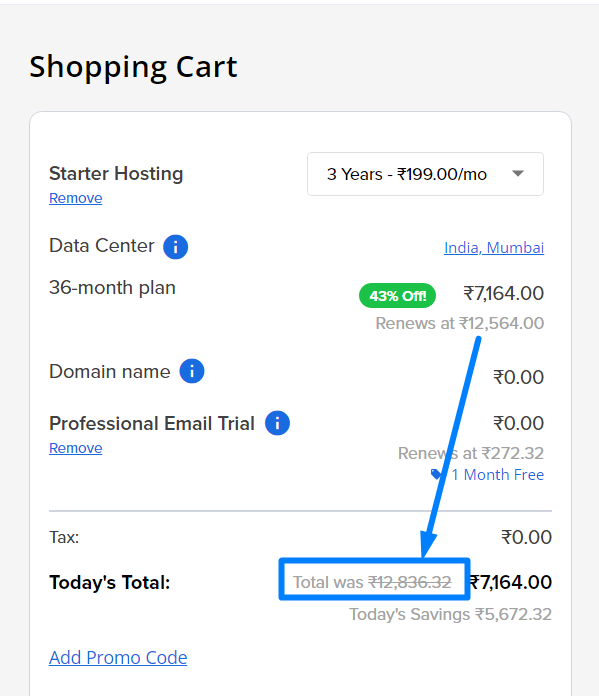
The biggest surprise for many new users appears when the introductory term ends.
After the initial discount period expires, the hosting plan renews at its standard rate, which is usually significantly higher.
This pricing structure is very common across the hosting industry, but it’s still something many new website owners overlook.
Here’s a simplified illustration of how the pricing structure typically works.
| Pricing Stage | What Happens | Typical Price Behavior | What Users Should Know |
|---|---|---|---|
| Introductory Period | First billing cycle after signup | Deep promotional discount | Lowest advertised monthly price usually requires long-term billing |
| Renewal Period | Hosting renews after initial term | Price increases to standard rate | Renewal cost may be 2–3x higher than the intro price |
| Future Renewals | Subsequent billing cycles | Remains at standard rate | Discount rarely repeats unless a new promotion applies |
When I analyzed real billing examples, I noticed that the monthly equivalent price shown on the homepage is often based on a long-term purchase, sometimes covering multiple years upfront.
This means the advertised monthly cost may appear very low, but the actual payment during checkout could be significantly higher because it includes several years of hosting in advance.
From a practical perspective, I usually recommend evaluating hosting plans based on the renewal price rather than the introductory offer, because that reflects the real long-term cost of running the website.
Hidden Fees in Bluehost Hosting Plans
When I went through the Bluehost checkout process, I noticed several optional services offered during account setup.
These services are sometimes mistaken for mandatory costs, but most of them are optional add-ons.
Common add-ons include:
-
domain privacy protection
-
automated backups
-
security monitoring tools
-
website optimization services
These features can be useful, but they also increase the total cost if selected during checkout.
For example, domain privacy hides personal contact information from public WHOIS records. While this can improve privacy protection, it’s not required for the hosting service to function.
Similarly, backup services allow automatic restoration of website files if something goes wrong. Some users consider this essential, while others prefer to manage backups independently.
The important takeaway is that these options are additional services rather than hidden mandatory fees.
User review: Angles – US
Avoid Bluehost if you don’t like hidden costs. They clutter the checkout with paid add-ons without telling you, making it easy to pay for things you don’t need. It’s clear they care more about making a quick buck than providing a transparent, high-quality service.
Bluehost Add-Ons and Optional Costs
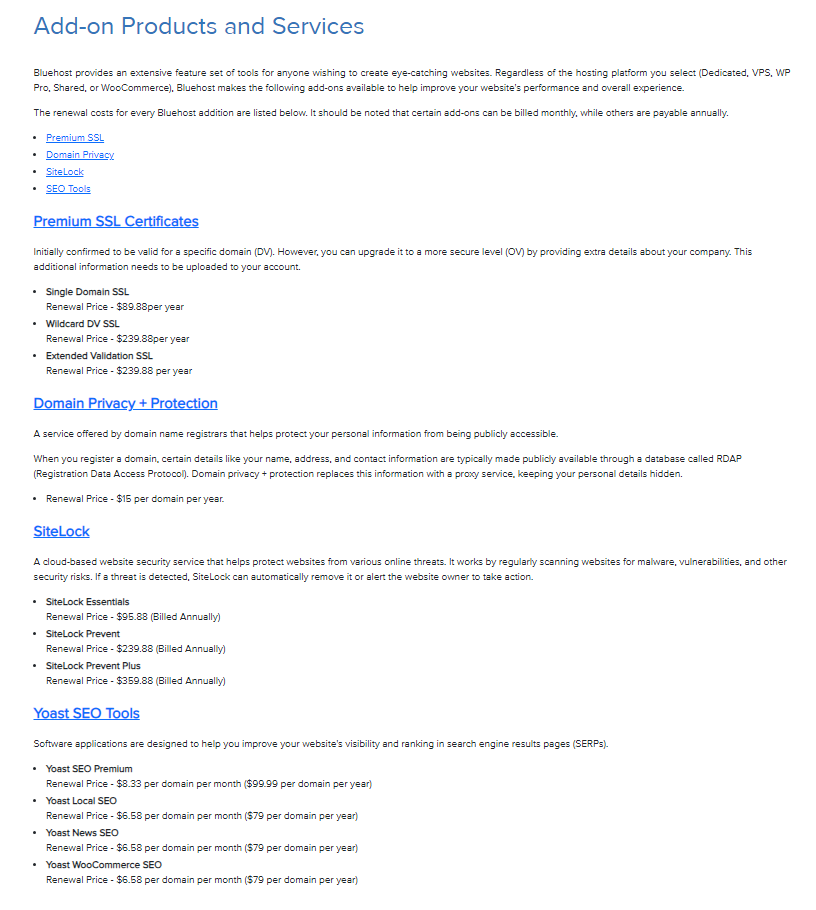
While reviewing Bluehost pricing, I found that add-ons can significantly change the final price depending on which options are selected.
Common optional services include:
Website Backup Tools
Automated backup tools create copies of website files and databases at regular intervals.
These backups can help restore a site after:
-
accidental deletion
-
plugin conflicts
-
security issues
Some users rely on external backup plugins instead, which may reduce the need for paid backup services.
Security Monitoring Features
Security add-ons may include malware scanning or site monitoring tools.
While useful, these services are typically optional because many website owners install third-party security plugins.
Domain-Related Services
Additional domain features may include:
-
domain privacy protection
-
premium DNS services
These options are often presented during checkout but are not mandatory for operating a website.
From a pricing investigation standpoint, these add-ons are best viewed as optional enhancements rather than core hosting costs.
Understanding Bluehost Pricing Transparency
During this investigation, one question stood out: is Bluehost pricing transparent?
From a technical standpoint, Bluehost does display the standard renewal price during checkout. However, it usually appears in smaller text compared to the promotional offer.
This presentation style can sometimes cause new users to focus primarily on the discounted price. That said, the renewal rate is not hidden – it’s simply less prominent than the introductory offer. This is a marketing practice used across much of the hosting industry.
The key takeaway for customers is to always review:
-
renewal pricing
-
billing duration
-
optional add-ons
before completing a hosting purchase.
Real User Pricing Experience
I recently came across a customer review that really resonated with me, describing a frustrating experience with Bluehost. The reviewer explained how they were unexpectedly charged $366.14 for a hosting service they hadn’t used in years, which immediately struck me as both surprising and concerning. What stood out even more was their attempt to resolve the issue – spending 45 minutes being transferred between multiple representatives, only to be told that a full refund wasn’t possible. From their perspective, the situation felt like being “nickel and dimed,” which reflects a deeper sense of dissatisfaction not just with the charge itself, but with the customer service experience as a whole.
User Review: M K – US
I am extremely disappointed with Web Bluehost. I was recently hit with a massive $366.14 renewal charge for a hosting service I haven’t used in years. When I called to resolve this, I was passed around between representatives for 45 minutes, only to be “nickel and dimed” and told that a full refund was impossible.
Pros and Cons of Bluehost Pricing
After examining the full pricing structure – including plan tiers, renewal costs, and optional add-ons – Bluehost pricing shows a mix of advantages and limitations that are fairly typical for large hosting providers.
Pricing Advantages
One of the most noticeable benefits is the low introductory pricing, which makes Bluehost accessible for beginners starting their first website.
During my review, the promotional offers were often competitive compared to many other entry-level hosting providers. This can lower the barrier to launching a website, particularly for bloggers, freelancers, or small businesses.
Another advantage is the structured plan hierarchy. Bluehost offers multiple tiers that allow websites to expand gradually without immediately moving to more complex hosting solutions.
Some plans also bundle additional features such as:
-
free domain registration for the first year
-
SSL certificates for secure connections
-
email hosting
-
website management tools
These bundled features can reduce the number of external services a website owner needs to purchase separately.
From a practical standpoint, Bluehost pricing can provide good short-term value for new websites, especially during the first hosting term.
Pricing Limitations
At the same time, the most significant limitation is the large price difference between promotional and renewal pricing.
While the introductory price can appear extremely affordable, the renewal cost may increase substantially once the initial term expires. For website owners who only evaluate the introductory price, this change can come as a surprise.
Another factor I noticed during checkout is the number of optional add-ons presented during the purchasing process. These include services such as backup tools, security monitoring, and domain privacy.
Although these services are optional, they can increase the total purchase price if selected without careful review.
Additionally, the lowest advertised monthly price usually requires longer billing commitments, meaning customers often pay for multiple years of hosting upfront.
This structure can make it harder for users who prefer true month-to-month hosting flexibility.
Overall, Bluehost pricing works best when users clearly understand:
-
how introductory discounts work
-
what the renewal cost will be
-
which optional services are actually necessary
When approached with that awareness, the pricing structure becomes much easier to evaluate realistically.
User Review: Igor Baranov – GB
BlueHost seems more interested in trapping customers with auto-renewals and surprise pricing than treating long-term customers fairly. The low introductory pricing is misleading when the renewal cost is 50x higher.
Is Bluehost Worth the Price in 2026?
After reviewing the bluehost fully, Bluehost appears to offer reasonable value for entry-level hosting, particularly during the introductory period.
For new website owners launching their first project, the discounted plans can provide an affordable way to get started.
However, it’s important to evaluate hosting based on long-term costs rather than just the first invoice.
From my perspective, Bluehost pricing works best for users who:
-
understand the renewal structure
-
plan for future hosting expenses
-
select only the add-ons they actually need
When approached with realistic expectations, the platform’s pricing can make sense for many beginner websites.
Conclusion
Investigating Bluehost pricing in 2026 reveals a familiar pattern used throughout the hosting industry.
The platform offers:
-
attractive introductory pricing
-
structured plan tiers
-
optional add-on services
But like most hosting providers, the renewal price is significantly higher than the initial offer, and optional features can increase the final cost.
For website owners who carefully review the pricing structure before purchasing, Bluehost can still represent a practical starting point for hosting.
The key is understanding how the pricing works beyond the promotional headline.
Frequently Asked Questions
Does Bluehost charge monthly or yearly?
Bluehost plans are usually billed upfront for longer periods, although the pricing is often displayed as a monthly average.
Why is Bluehost renewal more expensive?
The introductory discount applies only to the first billing period. Renewal occurs at the standard rate.
Are Bluehost add-ons required?
No. Most add-ons are optional services that can be skipped during checkout.
Does Bluehost include a free domain?
Many plans include a free domain for the first year, but domain renewal later requires payment.
Can users remove add-ons later?
Yes. Optional services can usually be disabled or canceled through the hosting account.
Is Bluehost pricing competitive?
The introductory pricing is competitive with many entry-level hosting providers.
Should users focus on promotional pricing?
It is generally better to evaluate hosting based on long-term renewal pricing rather than introductory discounts.