

One of the most frustrating parts of using any hosting service is not when things work but when they don’t, and you’re stuck waiting for support. That’s exactly why I paid close attention to DreamHost’s support while testing it. DreamHost customer support is positioned as 24/7 and reliable, with live chat and ticket-based assistance. On the surface, it sounds dependable.
But in actual use, I noticed a few gaps. Response times weren’t always consistent, some issues required multiple follow-ups, and the lack of immediate DreamHost Customer Support options became noticeable during more urgent situations.
In this DreamHost customer support review, I’ll break down how it actually performs – from response times to issue resolution – based on real usage, so you can understand where it works well and where it falls short.

Is DreamHost Customer Support Actually Reliable?
DreamHost support is available and functional, but reliability depends heavily on the type of issue and how urgently it needs to be resolved.
When I first reached out for basic queries, responses were reasonably quick and helpful. For simple questions like account setup or minor configuration, support handled things efficiently.
However, when I tested more technical or time-sensitive issues, the experience became less consistent. Some responses felt delayed, and in certain cases, I needed to re-explain the issue or wait longer than expected for a clear resolution.
This inconsistency makes the support feel dependable for routine tasks, but less reliable when timing and precision matter more.
Trustpilot Review: Martin W – MX
Service is bad (try monitoring your site with uptimerobot and you will see). Their support is even worse (they simply blame you, yes, the customer, for everything). And when I tried to cancel my subscription, they come up with a different rebilling cycle date.
DreamHost Customer Support Channels Explained: What You Really Get
DreamHost offers live chat and ticket-based support, but the absence of direct phone support changes how quickly issues can be handled.
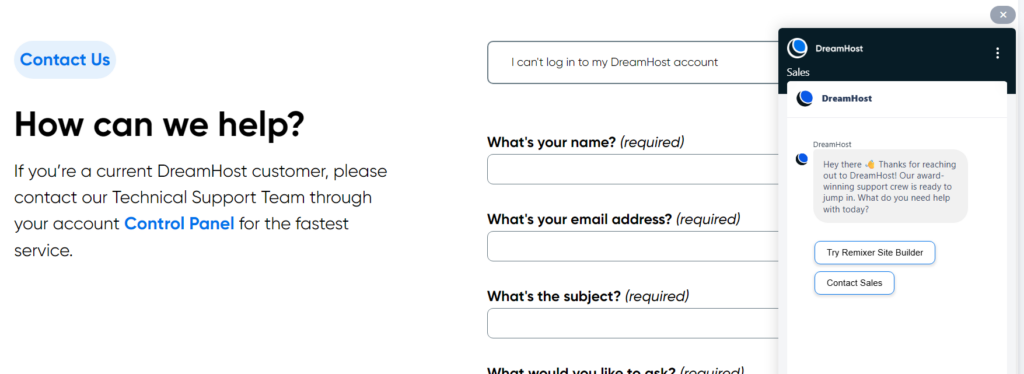
My Experience – DreamHost Customer Support Live Chat
Live chat was the fastest way to get initial responses. When I used it for basic queries, I was connected relatively quickly, and the responses were clear.
The limitation appeared when the issue required deeper technical handling. In those cases, the conversation was often redirected to a ticket, which added another layer of waiting.
Trustpilot Review: reg – US
Customer support used to be part of your hosting plan. Now they charge you to even ask a question. I instead chose the chatbot customer service, and got the message, “One of our Technical Support Representatives will be with you shortly.” I’ve been waiting 20 minutes. No signs of life.
Ticket Support: How Long It Actually Took to Get Help
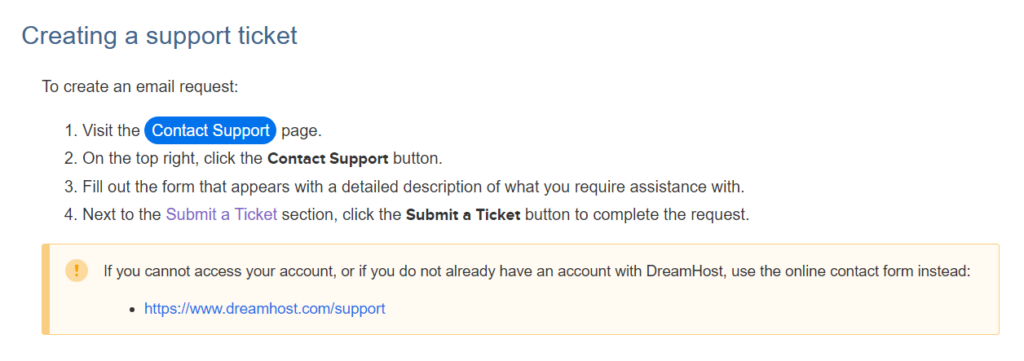
Ticket support is where most technical issues are handled. In my experience, response times varied. Some replies came within a reasonable timeframe, while others took significantly longer depending on complexity.
What stood out was that resolution often required back-and-forth communication. Instead of a single clear solution, I sometimes had to wait through multiple responses to fully resolve an issue.
Trustpilot Review: Mohammed Salah Bekakria – DZ
I opened a support ticket asking them to delete the account, and after more than 12 hours there was still no response. There is also no option in the dashboard to delete the account yourself.
DreamHost Customer Support for Phone Support: Why It Becomes a Limitation
The lack of direct phone support became noticeable when I needed quicker clarification. Without real-time communication, resolving urgent issues depends entirely on chat availability or ticket responses.
This isn’t a problem for non-urgent tasks, but when something affects site performance, the delay becomes more impactful.
DreamHost Customer Support Response Time: Fast or Frustrating?
DreamHost support response time felt inconsistent in my testing, and this aligns with patterns I noticed in user feedback as well.
| Issue Type | Typical Experience | What I Noticed |
|---|---|---|
| Basic Queries | Relatively quick via chat | Usually resolved in one interaction |
| Moderate Issues | Requires ticket follow-up | Takes longer due to response cycles |
| Complex Problems | Multiple replies needed | Resolution time increases significantly |
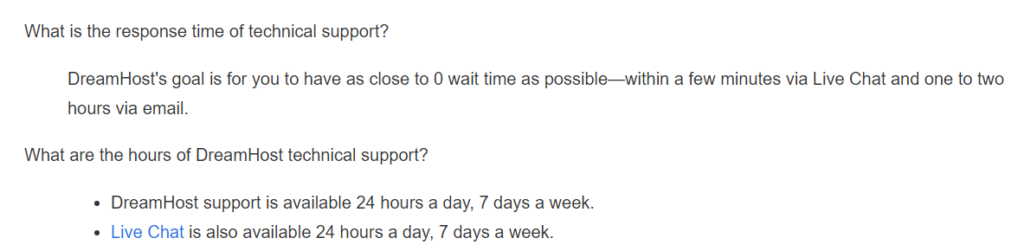
For simple queries through live chat, responses were reasonably quick. However, when I submitted tickets for more technical issues, the waiting time became less predictable. Some responses came within a few hours, while others took significantly longer, especially when the issue required deeper investigation.
What stood out was not just the delay, but the response cycle. Instead of resolving the issue in one interaction, I often had to wait through multiple back-and-forth replies. This extended the total resolution time more than expected.
This matches what I found in user complaints, where delays are not always about the first response, but about how long it takes to actually fix the issue. In several cases, users mentioned waiting across multiple responses for resolution rather than getting a direct answer upfront.
The result is that DreamHost Customer Support doesn’t feel consistently fast – it feels dependent on the complexity of the issue and how many response cycles it requires.
Trustpilot Review: Donald – US
extremely long wait time for ‘actual tech support’. questions weren’t fully answered, I still don’t understand what is going wrong with my site.
there seems to be a disconnect between customer service support and tech support — customer service support has to create a ‘support ticket’ for tech support to look at the problem — and that’s only after many back and forth communications between customer service support
Quality of Support: Do They Actually Solve Problems?
DreamHost support can solve problems, but the efficiency of resolution varies depending on how complex the issue is.
For basic issues, the support was clear and effective. However, when I tested more technical scenarios, the responses sometimes lacked depth initially. I had to follow up or clarify details before getting a complete solution.
This aligns with patterns I observed in reviews where users mentioned that support responses can feel somewhat generic at first, requiring escalation or repeated interaction to reach a proper fix.
Another issue I noticed was that troubleshooting often felt reactive rather than proactive. Instead of identifying the root cause immediately, responses sometimes focused on surface-level fixes first. This adds time when the issue is more technical.
In practice, this means support works but not always efficiently. The more complex the issue, the more likely it is to require multiple steps to resolve.
DreamHost Support Limitations You Should Know Before Relying on It
The limitations become clearer when looking at both usage experience and consistent user feedback patterns.
| Support Type | My Experience | Limitation |
|---|---|---|
| Live Chat | Quick for basic queries and initial guidance | Often redirects to tickets for technical issues |
| Ticket Support | Handles most technical problems | Slower due to back-and-forth responses |
| Phone Support | Not available by default | No real-time escalation for urgent issues |

Lack of Real-Time Urgent Support
During testing, the absence of phone support became noticeable when I needed quicker clarification. Everything depends on chat availability or ticket responses, which introduces delays.
This is also a recurring complaint in user reviews, especially from those dealing with urgent site issues. Without immediate escalation options, resolution speed becomes limited by the support system itself.
Inconsistency in Support Expertise
While some responses were helpful and clear, others required follow-up to reach a useful solution. This inconsistency suggests that the level of technical depth varies between responses.
From external feedback, I noticed similar concerns where users reported needing multiple interactions to get accurate or complete answers, particularly for more advanced issues.
Dependency on Ticket System for Most Issues
Most technical issues are routed through tickets, which creates a step-by-step response process. This naturally slows down resolution because each reply requires waiting.
Several users also highlighted frustration with this structure, especially when dealing with ongoing issues that required faster iteration. The system works, but it’s not optimized for speed.
Real User Complaints About DreamHost Customer Support
After testing support myself, I looked into user feedback to see if the same patterns appeared and they did.
Common Support Complaints From Real Users
A recurring issue across reviews is slow resolution time rather than complete lack of support. Users often mention that while responses do come, they can take time and require multiple follow-ups.
There are also mentions of frustration when dealing with ongoing issues, where the support process feels drawn out instead of quickly resolved.
Trustpilot Review: Anwar – MA
Support responses were slow and unhelpful, and no concrete resolution was offered. This situation feels unfair and unprofessional. If you rely on domain registrations for business purposes, be cautious; account restrictions can happen without transparency, and getting your money back may be difficult.
Patterns From Reviews and Forums
Across platforms like Trustpilot and Reddit, a few consistent themes appear:
- Delays in resolving technical issues
- Dependence on ticket-based communication
- Difficulty getting immediate help during urgent situations
Some long-term users specifically mentioned that support quality felt less responsive during critical moments, which aligns with the limitations I observed.
How My Experience Compared With These Complaints
My experience closely matched these patterns. I didn’t encounter complete failures in support, but I did notice delays, repeated interactions, and slower resolution for complex issues.
This consistency between personal testing and user feedback suggests that these are not isolated cases, but structural limitations in how support is handled.
When DreamHost Customer Support Works Well
DreamHost support performs reliably when the issue is simple, non-urgent, and clearly defined.
In my experience, basic queries were handled efficiently. When the request didn’t require deep technical troubleshooting, responses were clear and reasonably quick.
This shows that the system is structured more for general assistance than for handling complex or time-sensitive problems.
Best Scenarios for Using DreamHost Support
Support worked best when I needed help with account-related questions, basic configurations, or general guidance. In these cases, the responses were straightforward and didn’t require multiple follow-ups.
Since these issues don’t depend on immediate resolution, the ticket-based structure doesn’t feel like a limitation.
Situations Where Support Is Sufficient
Support is sufficient when the issue does not affect live site performance or require urgent action. If the problem can wait and doesn’t involve complex troubleshooting, the system works as expected.
In these scenarios, the slower pace of ticket responses doesn’t impact overall experience significantly.
Why Avoid DreamHost Customer Support based on Quality?
DreamHost is not the best fit if support reliability is a critical part of your hosting decision, especially when fast resolution directly impacts your site.
From my experience, the issue isn’t that support is unavailable – it’s that it doesn’t always respond or resolve issues fast enough when timing matters. This becomes more noticeable when dealing with performance issues or unexpected downtime.
This concern is reinforced by user feedback, where delays and repeated follow-ups are commonly mentioned, particularly in situations requiring immediate attention.
Not Ideal for Urgent or Mission-Critical Websites
If a website depends on uptime or real-time functionality, DreamHost’s support structure can become a limitation. During testing, I noticed that resolving issues often required waiting through ticket responses rather than getting immediate help.
Without phone support or instant escalation, urgent issues rely on chat availability or ticket queues. This delay may not seem significant initially, but when a site is affected, even short waiting periods can have a noticeable impact.
This aligns with user complaints where delays during critical situations created frustration, not because support was absent, but because it wasn’t fast enough.
Not Suitable for Non-Technical Users Needing Guidance
DreamHost support works better when the issue is clearly defined. In my experience, when I approached support with a specific problem, responses were more helpful. But when the issue required guidance or explanation, the process became slower and less efficient.
Some responses required clarification or follow-up before reaching a complete solution. For users who rely on support for step-by-step help, this can become frustrating.
User feedback reflects a similar pattern, where support is described as responsive but not always detailed enough for less technical users, especially when troubleshooting is involved.
When Support Becomes a Risk Factor
Support becomes a risk when delays directly affect site performance or user experience. I noticed this most when dealing with issues that required multiple interactions to resolve.
The ticket-based system creates a delay between each step, and if the issue isn’t resolved in the first response, the total time adds up quickly. This becomes more critical when the problem impacts site speed or availability.
From both my testing and user feedback, the risk isn’t lack of support – it’s the time it takes to reach a final resolution.
DreamHost Customer Support Pros and Cons (Reality Check)
Pros
- Support is available 24/7 through chat and tickets
In my experience, I was always able to reach support without being blocked, especially for basic queries. - Live chat works well for simple issues
For straightforward questions like account setup or minor fixes, responses were quick and clear without needing follow-ups. - Basic problems are usually resolved in one interaction
When the issue was clearly defined, support handled it efficiently without unnecessary delays. - Help center and documentation are useful
For common issues, I found their guides helpful enough to reduce the need for contacting support.
Cons
- No phone support limits real-time problem resolution
When I needed quick clarification, the lack of phone access meant I had to rely on chat or tickets, which slowed things down. This becomes critical during urgent issues. - Ticket-based system increases total resolution time
Most technical issues go through tickets, and each response requires waiting. From my experience, even simple technical problems took longer because of this back-and-forth structure. - Inconsistent response quality for complex issues
Some replies were helpful, while others required follow-up for clarity. This inconsistency means resolution often isn’t immediate, especially for deeper technical problems. - Multiple follow-ups often needed for full resolution
Instead of solving everything in one response, I sometimes had to go through several replies. This pattern is also commonly mentioned in user feedback, especially for technical issues. - Slower response during peak times or complex cases
I noticed delays when issues were more complex or during busier periods, which made support feel less predictable. - Not ideal for urgent or high-impact situations
The overall structure works, but when timing matters like during downtime or performance issues – the delays become a real limitation.
Final Verdict: Can You Rely on DreamHost Customer Support?
DreamHost support works but not when speed really matters.
In my experience, it handled basic issues well. Live chat and tickets were fine for simple questions, and I usually got answers without much trouble.
The problem starts with anything urgent or technical. Most issues go through tickets, which means waiting between replies. Without phone support, there’s no fast way to resolve critical problems. I often had to go through multiple responses before getting a complete solution.
This isn’t just my experience – it’s a common pattern in user feedback as well. The delay isn’t in getting a reply, but in how long it takes to fully fix the issue.
Quick decision:
- Good for simple, non-urgent support needs
- Not reliable for urgent, complex, or high-impact issues
If your site can afford to wait, it works. If it can’t, this becomes a clear limitation.
FAQs About DreamHost Customer Support
Does DreamHost offer 24/7 customer support?
Yes, DreamHost provides 24/7 support through live chat and tickets, but not all issues are handled instantly.
How fast does DreamHost support respond?
Response time depends on the issue. Basic queries are faster, while technical problems take longer due to the ticket system.
Does DreamHost have phone support?
No, DreamHost does not offer standard phone support, which limits real-time problem resolution.
Is DreamHost live chat reliable?
Live chat works well for simple issues, but more complex problems are usually redirected to tickets.
What are common complaints about DreamHost support?
Common issues include slow resolution time, multiple follow-ups, and lack of immediate support for urgent problems.
Can DreamHost fix technical issues quickly?
It can fix issues, but not always quickly. Complex problems often take longer due to the step-by-step ticket process.
Is DreamHost support good for beginners?
Yes, it works well for beginners with simple needs, but may feel limited for more advanced or urgent requirements.